


Version 19.0 brings one of the biggest technological leaps in the platform’s history, a new MCP server for integration with AI tools, a significant expansion of the Google Tag Manager data layer, international telephone dial code management, a redesigned administration sidebar, a new category landing page, and dozens of other improvements across both the backend and storefront. This version is marked as LTS (Long-Term Support), and we intend to actively support it and bring security updates for at least 2 years.
Technology stack upgrade
Version 19.0 upgrades the backend to PHP 8.5, Symfony 7.4, Doctrine ORM 3 + DBAL 4, and PostgreSQL 18, while the storefront is shifted to React 19. The goal is the same across the stack: to keep the platform on supported and actively maintained versions, pave the way for future enhancements, and reduce technical debt. As part of this modernization effort, Doctrine annotations have been replaced with PHP attributes, and the abandoned litipk/php-bignumbers library has been replaced with the actively maintained brick/math.
- PHP 8.5 – #4470
- Symfony 7.4 – #4448
- Doctrine ORM 3 + DBAL 4 – #4513
- React 19 – #4404
- PostgreSQL 18 – #4149
- Doctrine annotations → PHP attributes – #4395
- brick/math instead of litipk/php-bignumbers – #4484
New features
MCP server for AI tools connection (#4564)
The platform now includes its own MCP (Model Context Protocol) server, enabling super administrators to connect AI clients such as Claude Code, Codex CLI, and others directly to the project’s database for read-only exploration.
The server exposes a set of tools that allow AI agents to inspect the database and answer user questions about project data. MCP operates on a dedicated read-only Doctrine connection with row limits and statement timeouts in place. The database schema available to AI clients is explicitly defined by developers using PHP attributes, while a PHPStan rule ensures that no newly added database column is exposed to AI clients unintentionally. For auditing purposes, every tool invocation is logged to a dedicated Monolog channel.
Administrators can manage access through the “My MCP Server” section, either by generating tokens manually or through a browser-based OAuth flow, where connected clients can be revoked at any time. Everything is described in detail in the documentation.
International telephone dial code management (#4514)
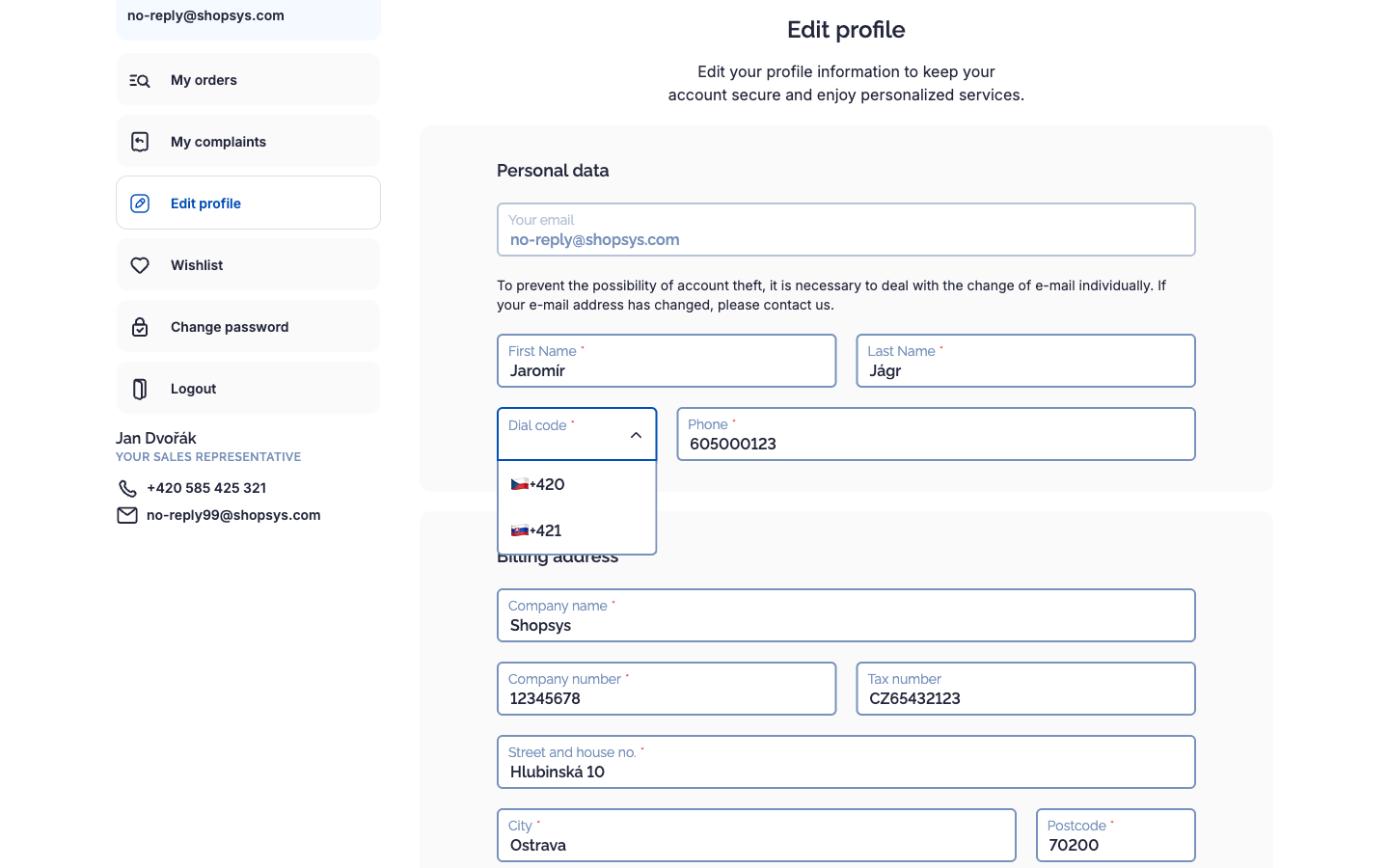
Until now, telephone numbers were stored as plain strings without any structure, making it impossible to reliably identify a country’s dialing code, validate numbers on a per-country basis, or filter by country. Version 19.0 introduces full support for international dialing codes: administrators can configure allowed dialing codes per domain (including a default option), and all telephone fields—in the administration, Frontend API, and storefront—now work with numbers split into the dialing code (e.g. +420), and the national number.
Existing data has been migrated accordingly. The former single telephone column has been split into three separate columns (dialing code, national number, and the app internally also uses country code to display proper flag). The values were parsed using libphonenumber, taking the domain context into account. Potentially problematic numbers—such as those with unknown or mismatched dialing codes—are visually highlighted in the administration interface, making them easy to identify and review.
Blog article statuses and publishing (#4490)
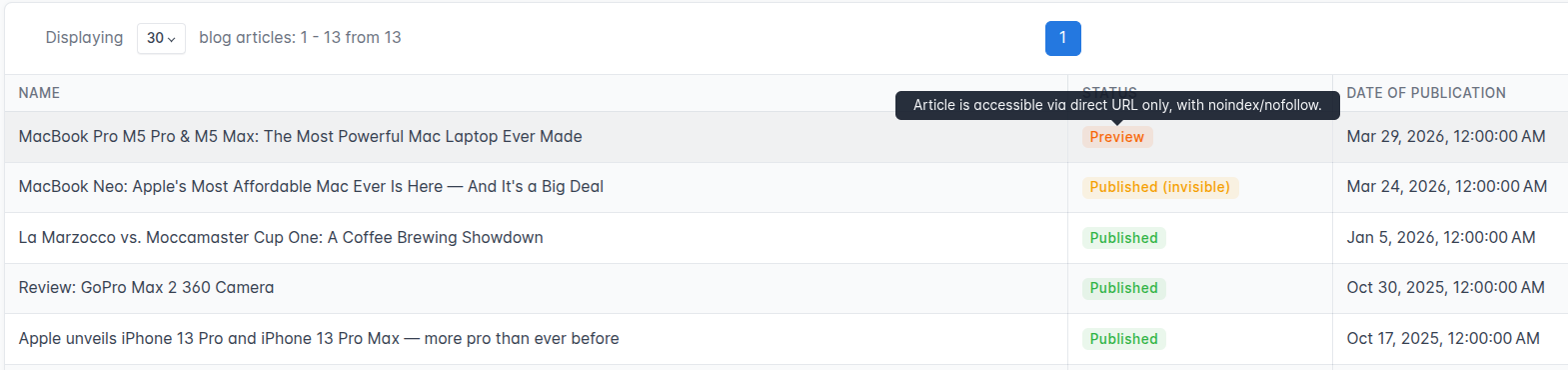
Blog articles now support domain-specific publishing states, allowing editors to prepare and share content without making it publicly available immediately. The new Preview state keeps an article accessible via its direct URL while automatically adding noindex/nofollow directives and excluding it from the sitemap—making it ideal for client reviews or editorial approval workflows. Both the article listing and detail pages now display status badges (Draft, Preview, Scheduled, and Published) based on the selected domain. The publication date is required only for articles in the Published state. When an editor manually switches an article to Published, the publication date is automatically prefilled with the current time of the respective domain.
Expansion and unification of the GTM data layer
A comprehensive review of the Google Tag Manager implementation on the storefront was carried out, along with the addition of new data fields to enable more detailed tracking of user behavior. What the store owner can now track:
- when a customer adds a product to favorites (wishlist) – #4594
- when a customer withdraws from an order – #4603
- how many results the autocomplete returned for the customer’s search – #4593
- specific product variants (e.g. color, size) for items in the cart – #4597
- complete data of a completed order, including products and satisfaction-survey consents – #4602
- company identifiers for business customer registration and login – #4595
- product ecommerce data in the watchdog event – #4598
In addition, the quality of data the platform was already sending to GTM has been improved:
- GTM works even for visitors with JavaScript disabled, thanks to the noscript iframe fallback – #4586
- page events use the current page metadata – #4591
- user data is populated according to source priority (pickup point, delivery address, etc.) – #4599
- the consent update event sends the current values from the form – #4585
Order total price rounding to €0.05 (#4522)
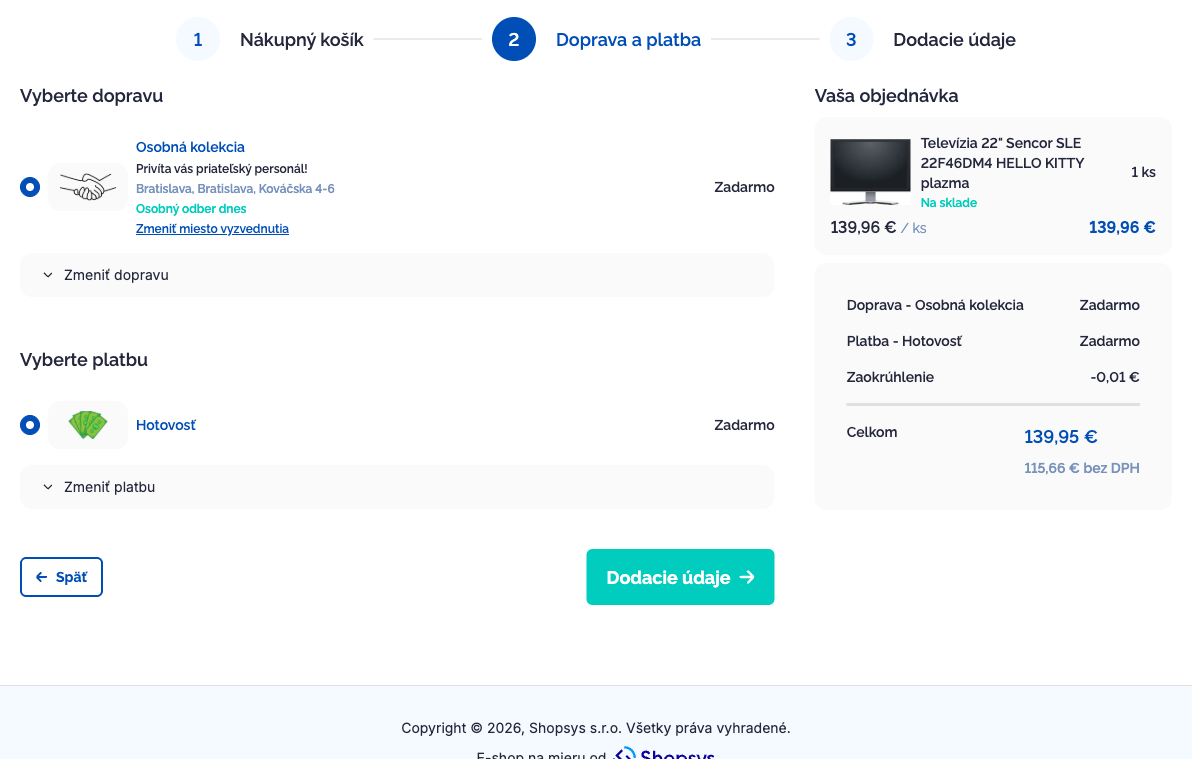
A few European countries (e.g., Slovakia) require the total order amount to be rounded to the nearest €0.05 when paying in cash, due to the withdrawal of 1- and 2-cent coins from circulation. The rounding logic has been generalized and decoupled from any specific currency, making it ready for additional use cases in the future.
Categories overview page
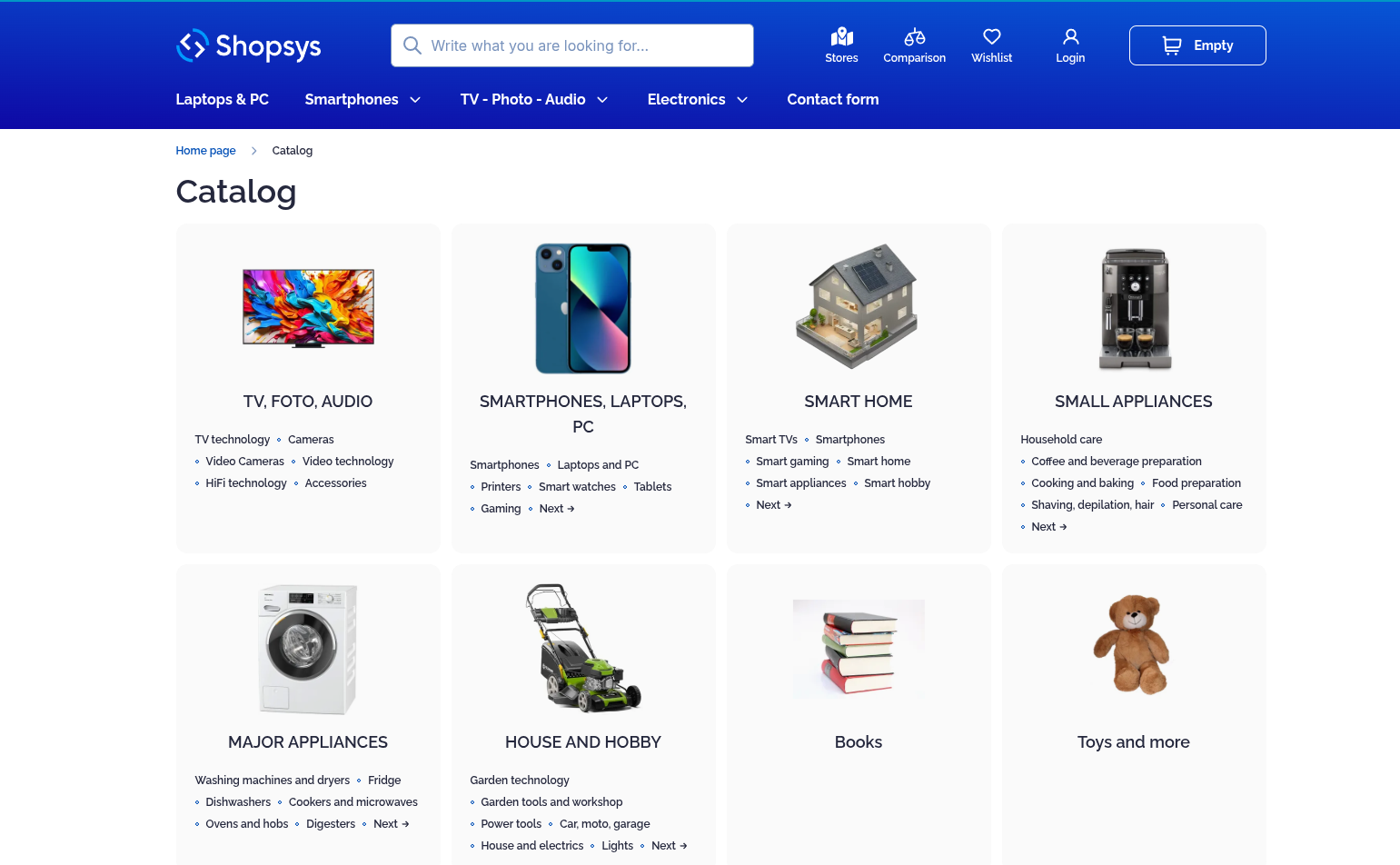
The storefront now includes a new static /catalog page (along with its localized variants), which always displays the category tree up to the second level. It serves as a permanently available navigation hub for both customers and search engines, and has also been added to the sitemap to support SEO.
Images for parameter values
For color-type parameters, it is now possible to upload a custom image instead of specifying an RGB value. This allows merchants to represent options more accurately, for example, an oak wood texture for flooring or a plaid pattern for a shirt. The image is displayed both in category filters and on the product detail page. Related administration improvements include clearer labels and help text for parameter value icons (including supported file formats), file previews, and the ability to select an existing file instead of uploading a new one.
Design and appearance
Administration menu facelift (#4573)
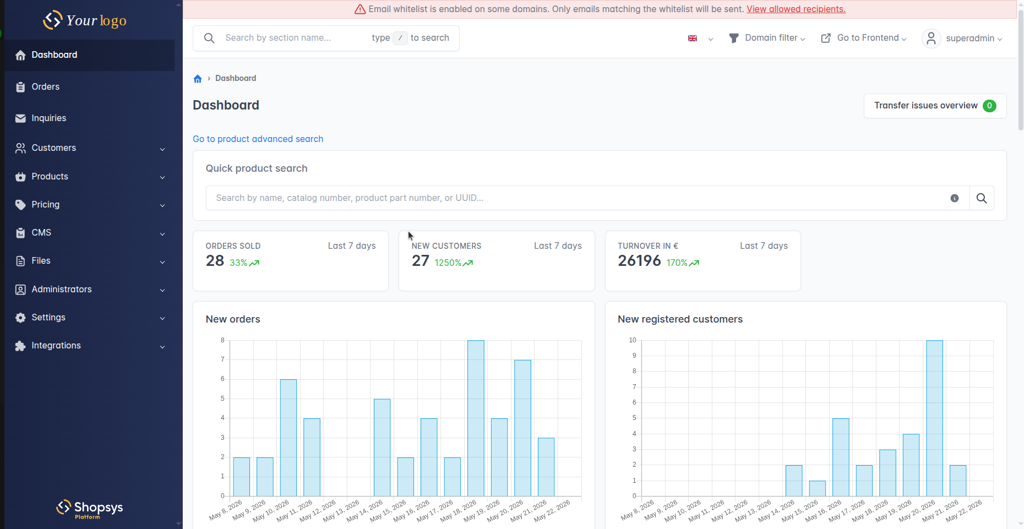
The administration menu has received a visual refresh, featuring a new primary color, a gradient background with white navigation links, and updated hover and active states. Projects can now also configure a custom logo for the administration interface, making it easier to align the back office with their own branding.
Pinnable sidebar admin menu items (#4533)
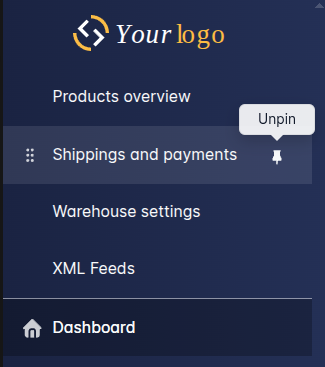
Administrators can now pin their frequently used menu items (both top-level and nested entries) to a dedicated “Pinned” section at the top of the sidebar. Simply hover over a menu item and click the pin icon that appears. Pinned items can then be reordered using drag-and-drop, allowing each administrator to tailor the navigation to their workflow.
Security and performance
CSP and other security headers
Static security-related HTTP headers are now configured at the Nginx level, including Content-Security-Policy (CSP), Referrer-Policy, Strict-Transport-Security (HSTS), X-Frame-Options, X-Content-Type-Options, and others. The CSP value configured by a super administrator is propagated to the storefront through the Frontend API. The header configuration process is described in detail in the platform documentation.
In addition, the release includes fixes for specific security vulnerabilities, including CVE-2026-4587 in Hybridauth, as well as referer URL validation for social login flows to help prevent open redirect attacks.
- Security headers – #4447
- CVE-2026-4587 (hybridauth) – #4547
- Open redirect validation for social login – #4320
Storefront performance audit (#4460)
Following the migration to React 19, a comprehensive storefront performance audit was carried out. As a result, Largest Contentful Paint (LCP) and Total Blocking Time (TBT) metrics have improved, while unnecessary page overhead has been reduced, resulting in a faster and more responsive user experience.
Developer experience
Shopsys CLI – new project bootstrapper (#4377)
A dedicated CLI tool has been introduced for initializing and configuring new projects based on Shopsys Platform. It eliminates much of the manual setup process, supports both interactive domain configuration and configuration from a YAML file, and can be used to fully create and configure a new project or modify an existing one. The CLI is distributed as a standalone PHAR and is maintained as a separate package, shopsys/cli. More information is available in the documentation.
CRUD controller extensions
The generic CRUD controller has gained additional capabilities. The delete action is now built in, meaning entities managed through the CRUD controller automatically support deletion out of the box, without requiring developers to implement a custom controller action. In addition, each CRUD module can now define its own icon for display in the administration menu, making navigation more intuitive and customizable.
Move image config from YAML to PHP attributes (#4421)
Image configuration (image types and sizes) has been moved from YAML files directly to entities using PHP attributes. Developers can now see the configuration right next to the relevant class, benefit from IDE autocompletion, and take advantage of significantly stronger static analysis and validation.
Strict types all over the codebase (#4396)
The coding standards now globally enforce the use of strict types across all relevant PHP files and automatically remove redundant annotations. This helps identify potential type-related issues earlier during code reviews and ensures a more consistent coding style across the entire codebase, including both the project base and platform packages.
Cron uses standard crontab syntax
Cron module scheduling now uses standard crontab syntax, making schedules easier to define and understand. In addition, cron modules are executed in isolated processes and support a stop_on_failure option, providing more predictable execution and finer control over cron job processing.
Conclusion
Version 19.0 LTS represents one of the most significant technological milestones in the platform’s history while also delivering practical features for every type of user. Developers benefit from improvements such as Shopsys CLI, enhanced CRUD capabilities, attribute-based image configuration, and stricter type enforcement. E-commerce operators gain access to the new MCP server, support for international telephone dialing codes, improved blog article workflows, a category landing page, image-based parameter values, enahnced cash rounding, and a refreshed administration interface. Marketers can take advantage of expanded Google Tag Manager events and SEO improvements in search functionality. For a complete overview of all changes, see the changelog and upgrade notes.
- Changelog: https://github.com/shopsys/shopsys/blob/19.0/CHANGELOG-19.0.md
- GitHub release: https://github.com/shopsys/shopsys/releases/tag/v19.0.0
We welcome your questions, ideas, and contributions. Join the discussion on GitHub Discussions, report an issue, or submit a pull request. Every piece of feedback helps us improve the platform and move it forward.
Čtěte také


